
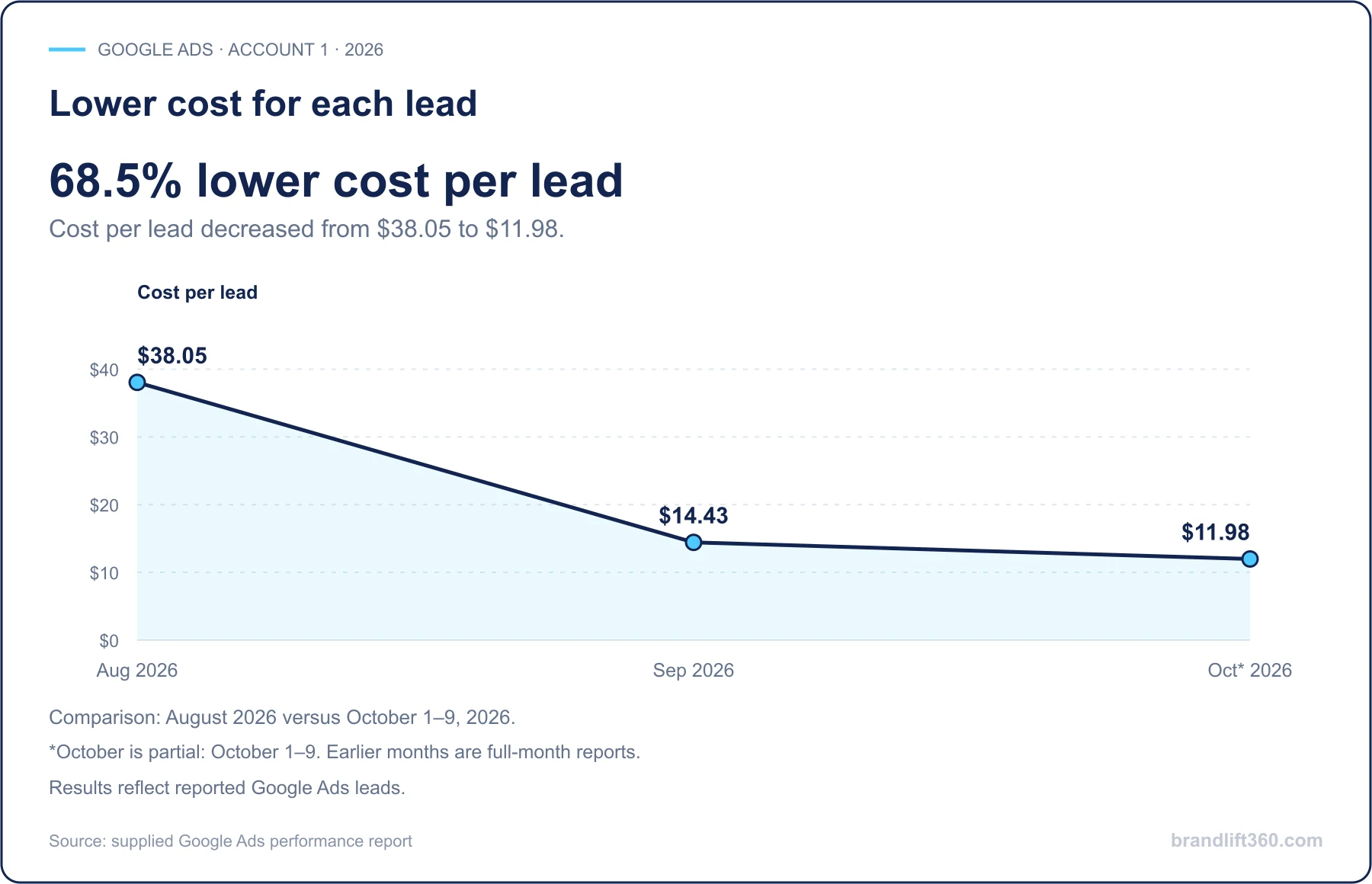
If your Google Ads get clicks but not appointments, the leak is almost always in one of three places: the searches you pay for, the page people land on, or how fast your office answers. Fix those before you raise the budget. More budget will not tell you which one needs work. Google Ads is pay-per-click (PPC) advertising, meaning you pay every time someone clicks, so medical PPC gets expensive fast when the clicks do not book. Our Google Ads management for medical practices checks all three stages before spend goes up.
Google Ads can show you impressions (how often your ad appeared), clicks, cost per click (what you pay each time someone clicks), and form conversions (forms submitted after a click). Those metrics are useful, but they do not tell you whether the person became a patient.
Ad spend → qualified inquiry → phone call or form → booked appointment → attended visit
Several gaps can interrupt that path:
- Your ads attract searches from people looking for jobs, training, research, or free advice.
- Your keywords are too broad for the services and locations you actually want to promote.
- Your landing page (the page the ad sends people to) does not match the service described in the ad.
- A patient calls after hours and reaches voicemail without an immediate follow-up.
- A form submission enters an inbox that no one checks consistently.
- Your agency reports leads without confirming whether they booked.
- Your tracking setup does not connect the original click to the appointment.
Keep platform conversions (the actions Google counts as a success), qualified inquiries and confirmed appointments separate. Internal appointment reporting is also separate from sending conversion data to advertising platforms.
Match Campaigns to Service and Location
Start with the services that matter most to your practice. Separate campaigns by meaningful intent, location, and service line instead of placing every term into one broad campaign.
For example, a dental practice may separate emergency dentistry, implants, and new-patient exams. A medspa may separate consultation searches from treatment-specific searches. A chiropractor may distinguish location-based searches from searches related to a particular service.
Then review the actual search terms producing clicks in Google’s search terms report. Add negative keywords (words you tell Google never to show your ad for) that filter out irrelevant searches, such as employment, education, free information, equipment, or services you do not provide.
Give Each Campaign a Relevant Destination
If the ad promotes a new-patient consultation, the page should explain who the consultation is for, what the next step looks like, where the practice is located, and how to request an appointment. Do not send every search to your homepage and expect the visitor to find the right path. The same page work helps organic search too; see these 9 SEO fixes to make before you spend more on ads.
Your landing page should include:
- A clear service-specific headline
- Practice location and contact details
- A prominent call and appointment option
- A mobile-first layout
- Short, focused scheduling forms
- Clear expectations about what happens next
- Privacy-conscious data collection
Healthcare advertising also requires restraint. Avoid unsupported guarantees, exaggerated outcomes, or language that pressures people based on sensitive health concerns, and check your ads against Google's healthcare and medicines advertising policy before launch.
Before activating tracking, review the information collected, its destination and the practice’s privacy requirements. A booking event is not automatically suitable to share with an advertising platform; HHS guidance on online tracking technologies explains why. HHS is the federal agency that enforces HIPAA, the law that protects patients’ health information, and a federal court set aside part of that guidance in 2024, so have your compliance advisor review your setup.
Assign Follow-Up for Calls and Forms
Call tracking (phone numbers that show which ad or page a call came from) can help identify calls generated by ads and website visits. Your team can then review practical outcomes such as:
- Answered versus missed calls
- New-patient versus existing-patient calls
- Qualified versus unqualified inquiries
- Calls that resulted in an appointment
- Calls requiring follow-up
- After-hours inquiries
Give missed calls and form submissions a response owner and expected callback time. Test that new requests actually reach the team.
An approved automated acknowledgment can bridge the gap, but clinical questions and unresolved requests need staff handling.
Report the Outcomes the Data Supports
- Which campaigns generated qualified inquiries?
- Which keywords generated calls or appointment requests?
- Which inquiries became booked appointments?
- What was the cost per booked appointment?
- Which campaigns produced missed calls or low-quality leads?
- Which services and locations deserve more budget?
Use reliable source and scheduling information to connect inquiries with bookings. Show unknown or assisted sources, and review proposed data sharing separately from internal reporting.
Before Increasing Spend
Before increasing your budget, confirm that:
- Your campaigns are separated by service, location, or patient intent.
- Search terms are reviewed regularly.
- Negative keywords remove irrelevant traffic.
- Ads match the landing pages they promote.
- Phone calls and forms are tracked separately.
- Missed calls receive a documented follow-up.
- After-hours inquiries have a clear booking path.
- Sensitive information is not sent to advertising platforms.
- Vendors and data flows have been reviewed for privacy requirements.
- Reports show qualified inquiries and booked appointments, not just clicks.
Choose the unresolved item closest to booking, fix it and compare the next reporting period before changing several variables at once.
For Sacramento click prices by treatment and how Google bills, see How Much Does Google Ads Cost for a Medical Practice? Your ad budget is paid directly to Google, with no markup from us. If missed calls are the weak stage, an AI receptionist can pick up the calls your team cannot get to.
Google Ads for Medical Practices at a Glance
| Stage | What to check | What to report |
|---|---|---|
| Searches you pay for | Campaigns split by service, location and intent; search terms reviewed; negative keywords added | Qualified inquiries by campaign and keyword |
| Landing page | One service-specific page per campaign, mobile-first, with a clear call and booking option | Calls and forms tracked separately |
| Office response | A named owner and callback time for every missed call and form, plus an after-hours path | Missed calls and time to callback |
| Privacy | Tracking and data sharing reviewed against HHS guidance and Google’s healthcare ad policy | What data goes to ad platforms, approved by your advisor |
| Budget | Ad budgets start at $1,500 a month per campaign; raise spend only after the stages above work | Cost per lead (our dental accounts: approximately $70) and cost per booked appointment |
Common Questions About Google Ads for Medical Practices
What is medical PPC?
Pay-per-click advertising for medical practices, most often Google Ads. You pay only when someone clicks your ad, so each click needs to come from someone looking for your service in your area, land on the matching service page and reach someone in your office who can book them.
How much should a medical practice spend on Google Ads?
We start ad budgets at $1,500 a month per campaign, paid directly to Google. That is enough to learn which searches and pages produce inquiries without committing a large amount before you have data. Increase the budget only after calls and forms are being answered and booked.
What is a good cost per lead for a medical practice?
It varies by specialty and market. In our dental accounts, cost per lead has been approximately $70. A lead means a call or form, not a booked visit, so also track cost per booked appointment. At approximately $70 per lead, a $1,500 month works out to roughly 21 inquiries, and the booking rate depends on how quickly your office responds.
Why am I getting clicks but no appointments?
Usually one of three stages is broken: the ads match searches you do not want, the landing page does not match the ad, or inquiries are not answered quickly. Review search terms, the page and your response time in that order.
Can I send appointment data to Google Ads?
Only after a privacy review. Keeping booking reports inside your practice is different from sending them to an advertising platform. Read the HHS guidance on online tracking technologies and have your compliance advisor approve any data sharing.
Choose Your Next Priority
Open your last 30 days of search terms and mark every search you would not want to pay for. Then call your own ad number after hours and see what happens. Those two checks usually show whether the leak is in the searches or in the response. Fix that one stage, compare the next 30 days, and only then change the budget.
Sources
- Google Ads Help, About the search terms report (accessed October 2026).
- Google Ads Help, About negative keywords (accessed October 2026).
- Google Advertising Policies Help, Healthcare and medicines (accessed October 2026).
- U.S. Department of Health and Human Services, Use of Online Tracking Technologies by HIPAA Covered Entities and Business Associates (issued 2022, updated June 26, 2024, with notice of the June 20, 2024 court order in American Hospital Association v. Becerra).
- Brand Lift 360 (our own data): dental cost per lead of approximately $70, taken from our clients’ Google Ads accounts, where a lead is a tracked call or form, not a booked visit.