See the inquiry
Organize available calls, texts, forms and chat in a connected workflow.

Healthcare CRM & practice software
Bring calls, messages and website inquiries into a workflow your staff can follow. We configure inquiry routing, reminders and supported scheduling connections around your existing systems.
KloudMD, configured and managed by Brand Lift 360.
Features and integrations follow your selected plan.

Put the conversation in context
Separate inboxes make it easy to lose track of a request. A healthcare CRM gives your staff a place to see the conversation, its owner and the next action.
We connect the tools in your plan, assign response responsibilities and test follow-up with your team.
Explore the softwareOrganize available calls, texts, forms and chat in a connected workflow.
Set ownership, status and follow-up rules around your practice.
Connect available source and appointment data while keeping unknown sources visible.
Your team retains clinical decisions. Automated tools support administrative workflows, with appropriate handoff to a person.
Connected practice software
Explore the tools your team needs for calls, messages, appointments and follow-up. We confirm features and integrations with your practice before setup.
AI voice can support routine administrative calls, overflow and after-hours inquiries. We configure the practice knowledge, permitted actions and staff handoff around the way your office works.
Explore Voice AIHelp website visitors get routine practice information and reach the right team through a configured AI chat experience. We connect the conversation with the follow-up workflow in your plan.
Explore AI ChatUse administrative AI assistance and configured automation to keep inquiries, tasks and follow-up organized. Brand Lift 360 helps define the workflow, permissions and points where a person reviews the result.
Explore AI Tools & AutomationBring your EHR or scheduling system into the conversation before choosing an automation. We verify the exact platform, access and required functions so the connection supports the work your practice needs.
Explore EMR IntegrationsCoordinate practice calling with the conversation and follow-up tools your staff use. We configure routing, access and the supported call workflow around the people responsible for answering.
Explore Practice PhoneGive your staff a coordinated way to send and receive permitted practice messages. We configure ownership, templates and follow-up so replies reach the team responsible for the next step.
Explore Two-Way TextingUse available call summaries, categories and review tools to understand the conversations reaching your practice. We help your team turn observations into practical follow-up and coaching priorities.
Explore Call IntelligenceKeep internal conversations organized around the people doing the work. Team chat can bring direct and group communication into the practice software your staff use throughout the day.
Explore Team ChatConnect appointment requests and supported booking functions with your practice’s provider, location and visit rules. We configure the pathway around your actual scheduling process.
Explore SchedulingSupport visits and follow-up with configured administrative reminders. We plan timing, channels and staff handling around the appointment data and contact permissions available to your practice.
Explore Reminders & RecallBuild a practical process for requesting honest feedback and reviewing public responses. We connect the timing and follow-up with your practice’s workflow while respecting privacy and platform rules.
Explore Review WorkflowsWhere supported, eligibility tools help staff review available payer information before a visit. We confirm the practice identifiers, payer access and workflow needed for the selected configuration.
Explore Insurance EligibilityA workflow you can follow
Collect the available inquiry and channel information in the configured workflow. Source data is useful when it is present and reliable.
Set a team owner, current status and the next task. Define when an automated reply is appropriate and when a person should take over.
Configure permitted reminders and follow-up with your practice’s consent, timing and opt-out requirements. Test the sequence before activation.
Review bookings, attendance and other available outcomes. A source can be unknown or assisted, and those limits belong in the report.
Illustration of the workflow. Your enabled features and supported integrations determine the actual configuration.
Your team’s next action / illustration
A call, text or website inquiry enters the workflow.
A staff owner and next action are recorded.
Configured messages and staff actions move it forward.
Available appointment status and source context are reviewed.
Implementation with a plan
Bring your EHR or scheduling system’s name and version, your inquiry channels and the task you want to improve. We confirm supported functions before proposing an integration.
Your scope covers access, configuration, staff training, testing, subscriptions and ongoing management.
Explore EMR integrationsFeatures, integrations, usage and staff responsibilities.
The right configurationPractice information, permissions and real workflow checks.
Ready for your teamAvailable inquiry outcomes and feedback from the people using it.
Ongoing managementThe workflow and the outcome
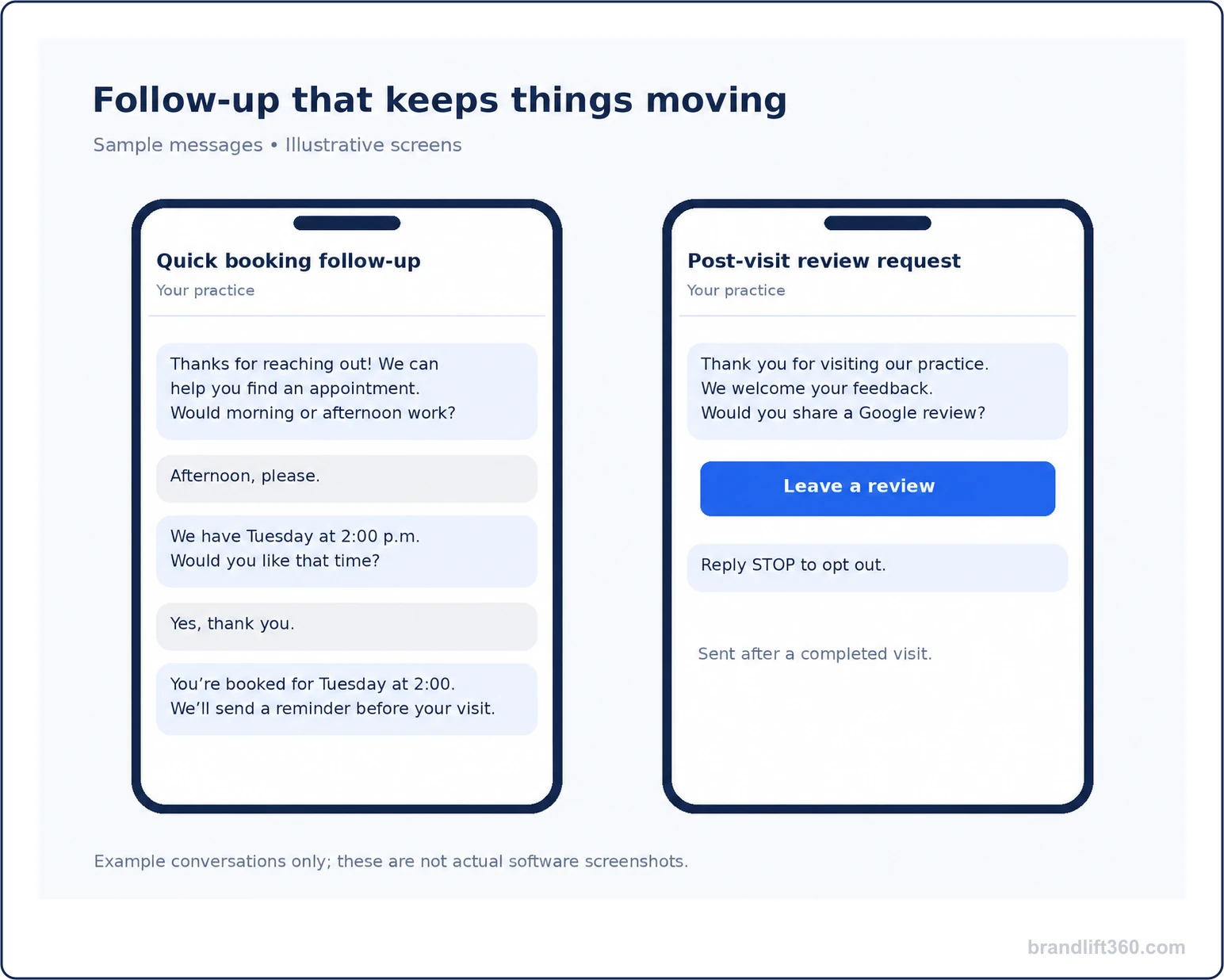
Illustrative messages
A booking conversation and a post-visit review request show how an administrative follow-up workflow can feel clear and useful.
Example messages, not actual patient conversations or a promise of software-screen appearance.
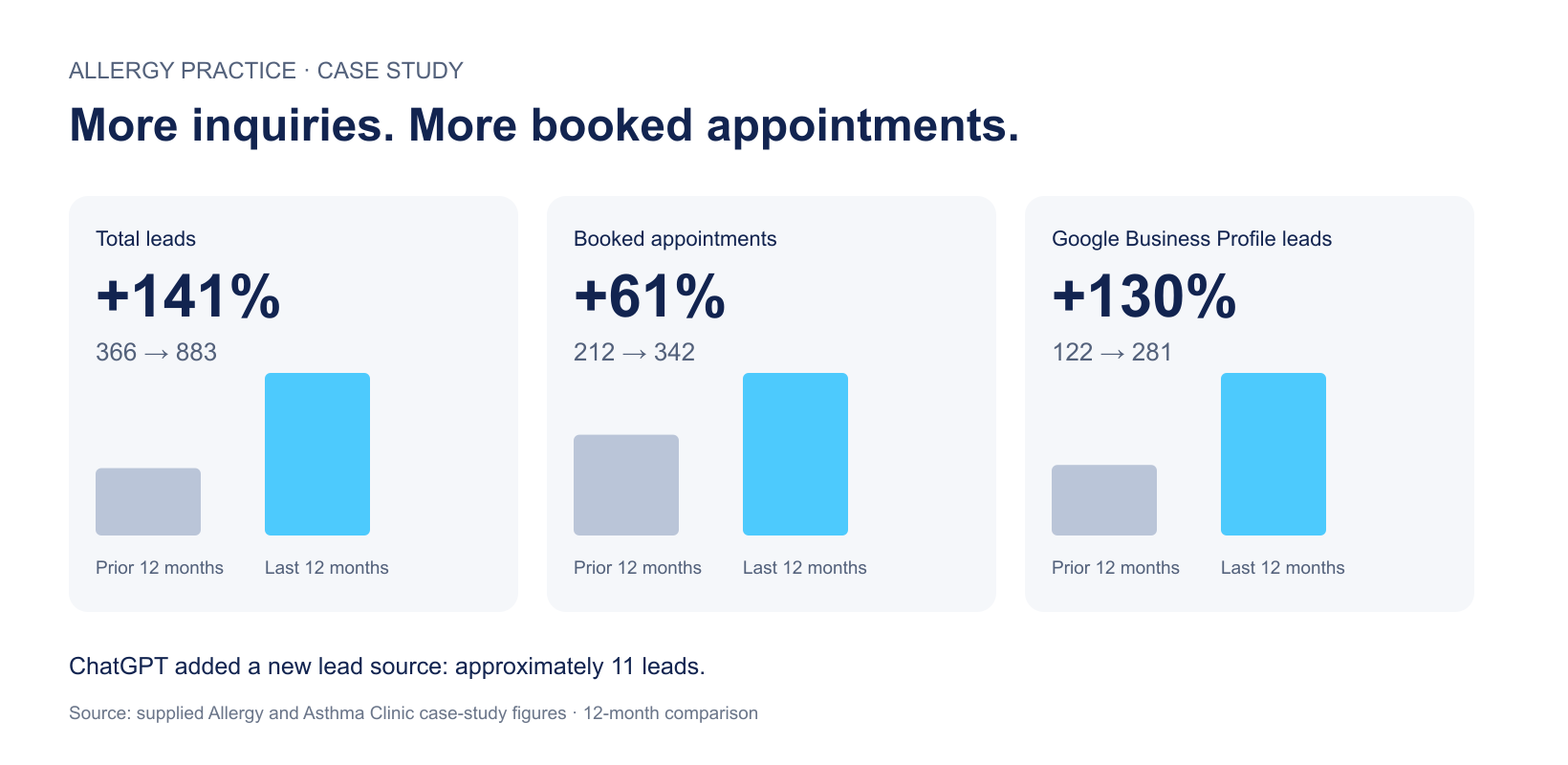
Reported practice results
The allergy and asthma practice report records a 61% increase across two 12-month periods.
Results cover a wider marketing program. This report does not isolate the effect of the CRM and is not a forecast.
It is software that helps organize inquiries, conversations and follow-up around your practice. It can connect available channel, task and appointment information so staff can see the next action. It does not replace your team’s clinical judgment.
No. KloudMD is the platform we configure and manage for your practice's marketing and patient communication workflows. Your agreement defines platform access, subscriptions and the services Brand Lift 360 provides.
KloudMD is our HIPAA-compliant practice communication platform, with a Business Associate Agreement (BAA) provided for covered services. We configure access, data flows and staff procedures for your practice before use.
We check the exact system, version, permissions and functions you need. Reading availability, requesting an appointment, creating a booking and synchronizing a record are different functions. We confirm the supported connection before implementation.
It can support routine administrative inquiries, overflow and after-hours coverage where enabled. We define approved information and staff transfer rules. Your team keeps responsibility for patient care and important decisions.
Yes. The workflow includes staff ownership and human handoff. We agree which replies can be automated and when a person should take over.
Where reliable tracking and scheduling data support it, reporting can connect sources with appointments. Unknown, assisted and missing sources remain visible. Complete attribution is not guaranteed.
You retain your business data, with access and export arrangements defined in your agreement. Continued use of licensed software may require an active subscription.
No. CRM and software are included according to your selected marketing plan and agreed configuration. Features, integrations, usage limits and any additional charges are confirmed in your scope. View plans and pricing →
Workflow capabilities depend on the enabled software and confirmed integrations. Review HHS’s Security Rule overview for the importance of administrative, physical and technical safeguards.
Your connected front office
Book 15 minutes with Jenn or Danzell. Bring the task that costs your team the most time and the systems you currently use.
Where inquiries arrive and what happens next.
The EHR, calendars and channels you use.
Features, access and implementation.
Included in our marketing packages.
CRM and software features depend on your selected plan, configuration and supported integrations.