
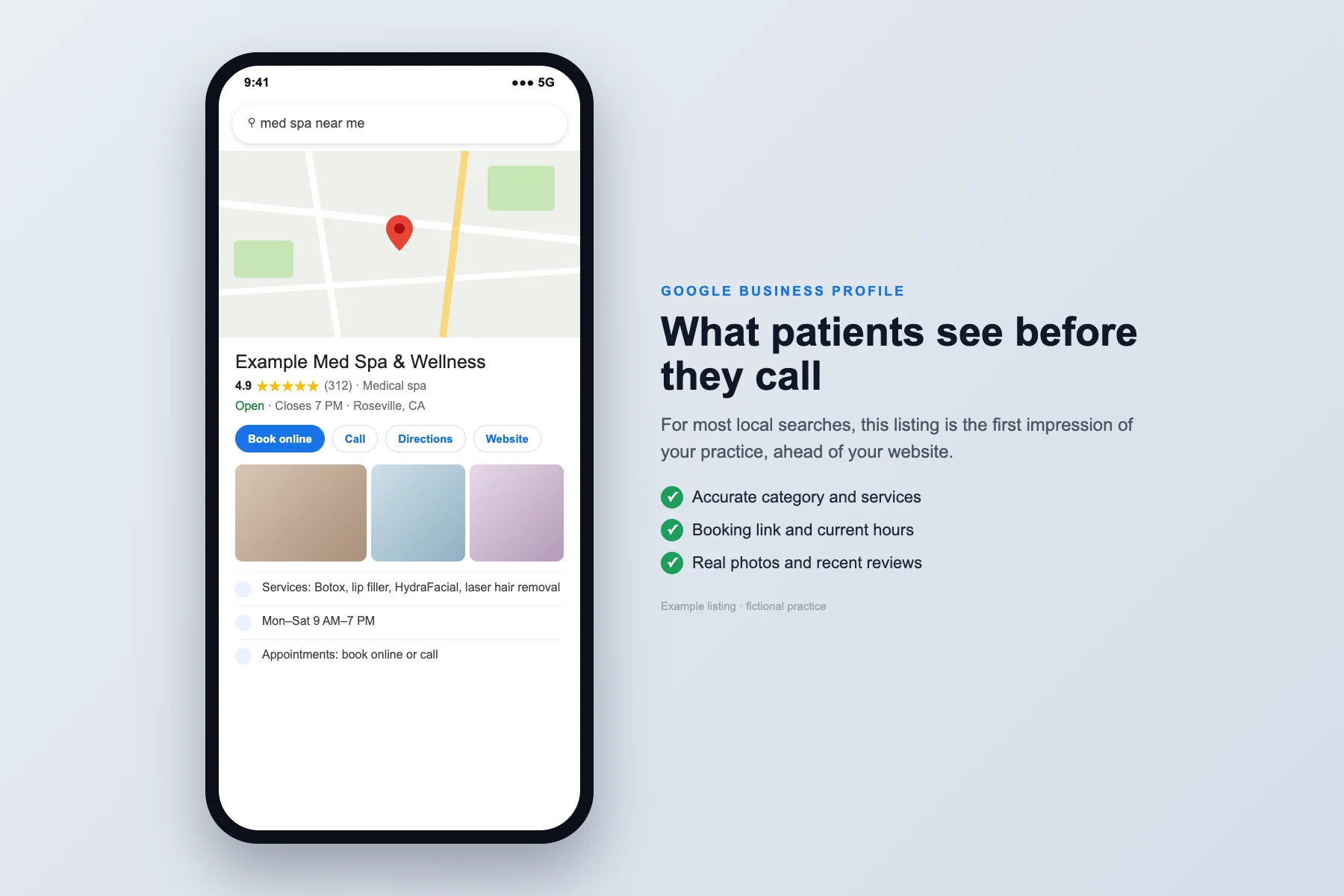
To get more local patients from Google, make sure your Google Business Profile has your real name, the most accurate primary category, current hours, a working booking link, real photos and a fair review process. Your Google Business Profile is the free listing that appears in Google Maps and local search results when someone looks for care near them. It is often the first thing a patient sees, so errors there cost calls.
Check the listing a patient sees before calling your office. This Google Business Profile optimization checklist covers office accuracy, useful service information, reviews, doctor profiles and the path to an appointment, the same checklist our Google Business Profile service works through. A strong profile is what gets a practice into the map pack, the box of three local results with a map that appears near the top of many searches.
1. Correct Your Name, Address, and Phone Number
Your practice name, address, and phone number are known as your NAP (name, address, phone) information. These details should match across your Google Business Profile, website, healthcare directories, social profiles, and local listings.
Check platforms such as Healthgrades, Yelp, Zocdoc, WebMD, Apple Maps, and insurance directories. Look for outdated suite numbers, old phone numbers, inconsistent abbreviations, duplicate listings, and former practice names.
Use your real practice name. Do not add extra keywords such as “Best Dentist in Roseville” unless that is your legitimate business name. Keyword stuffing (packing search terms into places they do not belong) can create trust problems and may violate Google’s profile guidelines.
Google publishes guidelines for representing your business that spell out what a profile name and details may include. Keeping listings consistent is also a core part of local SEO, the work of showing up when people search for care near them.
2. Select the Most Accurate Primary Category
Choose the most specific category available for your practice. A dental practice, chiropractic office, podiatry clinic, ENT specialist, and med spa should not all use a generic “medical clinic” category if a more accurate option exists.
Review your secondary categories as well. Google's guidelines say to choose the fewest categories it takes to describe your core business, as specific as possible. Add only services and specialties that you genuinely provide. The goal is not to select every possible category. The goal is to accurately communicate your core areas of care.
3. Add and Improve Your Services
Use patient-friendly names instead of internal terminology. Add short descriptions that explain who the service is for, what the appointment involves, and how patients can take the next step.
Where supported, connect the profile to the relevant service or location page so the website answers the questions the listing cannot.
4. Confirm Your Hours and Booking Links
Review regular hours, holiday hours, appointment-only schedules, and temporary changes. If your practice has multiple locations, confirm that each location has the correct information.
Your booking link should lead directly to a working, mobile-friendly scheduling page. Test it from a phone. Make sure patients can understand what to do, choose an appropriate appointment type, and submit their request without unnecessary steps.
5. Replace Weak Photos with Authentic Practice Images
Photos help prospective patients answer practical questions before they contact you. They want to know what the building looks like, where the entrance is, whether the waiting room feels professional, and what to expect when they arrive.
Use sharp, high-resolution images of your actual:
- Exterior and entrance
- Reception area
- Waiting room
- Treatment or exam rooms
- Equipment
- Accessibility features
- Providers and staff
Refresh your photo library when you renovate, move locations, add equipment, or update your patient experience. High-quality practice photography also gives you useful content for your website and social channels.
6. Use a Fair Review Process
Invite honest feedback using practice-approved messages, appropriate permissions and opt-out handling.
Do not offer incentives, request only positive reviews or prescribe medical details and keywords; Google's Maps content policy bans incentives and selectively soliciting positive reviews. Public replies should not confirm a patient relationship or discuss individual care. In 2023, HHS settled with a New Jersey provider that disclosed patient information in replies to negative online reviews.
Assign sensitive concerns to a staff member through the practice’s private process. Review Google’s content policies →
If you want help requesting and answering reviews consistently, see our reputation management service.
7. Publish Updates When There Is Useful News
Post information that is genuinely useful, such as:
- New patient appointment availability
- Updated holiday hours
- Seasonal health reminders
- New services or providers
- Educational answers to common questions
- Community events
- Confirmed changes to insurance information or the appointment process
Keep updates specific and link to the relevant information. A posting schedule does not guarantee a ranking improvement.
8. Link to the Correct Location Page
Create or improve a location page that includes your:
- Exact practice name, address, and phone number
- Primary services
- Service area
- Parking and access information
- Insurance or payment details, where appropriate
- Provider information
- Clear appointment call to action
- Embedded map and directions
If you operate multiple locations, create a useful page for each one. Avoid copying the same text and changing only the city name. Each page should include genuinely relevant information about that location.
9. Compare the Same Searches and Locations
A competitor comparison shows you what patients see when they search for care in your area. Search your priority terms from several nearby locations, such as “dentist near me,” “chiropractor in [city],” or “med spa [city].”
Compare the top practices on:
- Primary category
- Number and recency of reviews
- Review response activity
- Services listed
- Photo quality and quantity
- Google Updates
- Appointment links
- Website content
- Frequently asked questions
Use the comparison to identify missing details or a harder booking path. Record the date and search location rather than treating one result as your permanent position.
10. Separate Interactions from Appointments
Google’s call metric records call-button clicks, as its performance help page explains. It does not establish that a call was answered or a visit booked. Review actual inquiries and appointment records separately where your systems support it.
Track the actions that matter:
- Call-button clicks reported by Google
- Website visits
- Available appointment-link interactions
- Contact form submissions
- New patient inquiries
- Scheduled appointments
- Completed appointments
Review proposed link tagging (adding a short code to your website link so analytics can tell the visit came from Google) or call tracking with your practice before setup. Preserve accurate business contact information and verify what the resulting data can measure.
Google Business Profile for Doctors: Practitioner Listings and Duplicates
Medical practices have one setup question most businesses do not: should each doctor have their own profile? Google calls these practitioner profiles. Its guidelines allow one for a public-facing professional who can be reached at the verified location during stated hours. Support staff should not have their own profile.
How to set it up, according to Google's guidelines:
- Group practice: one profile for the practice location, plus a separate profile for each eligible doctor. The doctor's profile uses only the doctor's name, and may add a title such as Dr. or MD.
- Solo doctor at a branded practice: share one profile, named "[Practice name]: [Doctor's name]."
- One profile per doctor: do not create extra profiles for each specialty, and only one profile per location.
Duplicates split your reviews and can confuse Google about which listing to show. Breaking these rules, including stuffing keywords into a name, can lead Google to suspend a profile. Search your practice and each doctor's name in Google Maps, and ask Google to merge or remove any duplicates you find.
How to Keep Your Google Business Profile Optimized
Review it after a move, provider change, new service, holiday schedule or booking-system update. Assign someone to communicate those changes so the listing stays accurate.
Our Google Business Profile Optimizer is available as a $500 one-time engagement covering months one through three.
Google Business Profile Optimization Checklist at a Glance
| Check | What good looks like |
|---|---|
| 1. Name, address, phone | Real practice name, identical details on Google, your website and every directory |
| 2. Primary category | The most specific accurate category, with only the secondary categories you truly provide |
| 3. Services | Patient-friendly names and short descriptions, linked to the matching page on your site |
| 4. Hours and booking link | Current and holiday hours; a booking link that works on a phone |
| 5. Photos | Real images of the entrance, rooms, equipment, accessibility features and team |
| 6. Reviews | Ask everyone fairly, no incentives, replies that never confirm someone is a patient |
| 7. Updates | Posts only when there is useful news: hours, providers, services, events |
| 8. Location page | A unique page per office with address, services, parking, providers and directions |
| 9. Competitor check | The same searches from several nearby spots, with the date and location recorded |
| 10. Measurement | Call-button clicks kept separate from real inquiries and booked appointments |
| Doctor profiles | One profile per eligible doctor, correct naming, no duplicates |
Common Questions About Google Business Profiles
How do I get my medical practice to show up in Google Maps?
Claim and verify your Google Business Profile, choose the most accurate primary category, keep your name, address and phone number identical everywhere, and collect honest reviews. Proximity to the searcher also matters, so no profile can guarantee a top spot. Your profile also feeds Google AI answers; see how to win local patients as AI Overviews grow.
How long does it take for Google Business Profile changes to show?
Google reviews profile edits before they go live, so timing varies. Simple edits such as hours and phone numbers are usually quick, while changes to your name, category or address can take longer. Check the edit status in your profile after each change.
Can I ask patients for Google reviews?
Yes, as long as you ask everyone fairly and do not offer incentives or screen for positive feedback only. Replies should never confirm that someone is a patient or mention their care.
Should each doctor have their own Google Business Profile?
Yes, if the doctor is public-facing and can be reached at your verified location during stated hours. A solo doctor at a branded practice should share one profile named "[Practice name]: [Doctor's name]." Avoid duplicate profiles for the same doctor or location.
Does a Google Business Profile replace my website?
No. The profile answers quick questions and links to your site, where a service or location page answers the rest. Patients who click through need a fast, mobile-friendly page and a clear way to book.
Choose Your Next Priority
Open your profile on your phone and check three things first: the primary category, the hours and the booking link. Those three errors cost calls fastest, and each takes minutes to fix. Then work down the table above one item a week. If you also want to know whether AI assistants such as ChatGPT name your practice when patients ask, our Practice Growth Review checks that.
Sources
- Google Business Profile Help. Guidelines for representing your business on Google (undated help page, accessed October 26, 2026).
- Google Business Profile Help. Tips to improve your local ranking on Google (relevance, distance and prominence; undated help page, accessed October 26, 2026).
- Google Business Profile Help. Edit your Business Profile (undated help page, accessed October 26, 2026).
- Google Business Profile Help. Understand your Business Profile performance and insights (defines calls as clicks on the call button; undated help page, accessed October 26, 2026).
- Google Maps User Generated Content Policy Help. Prohibited and restricted content (incentives and selective review requests; undated help page, accessed October 26, 2026).
- U.S. Department of Health and Human Services, Office for Civil Rights. Settlement with Manasa Health Center over patient information disclosed in replies to online reviews (June 5, 2023).