
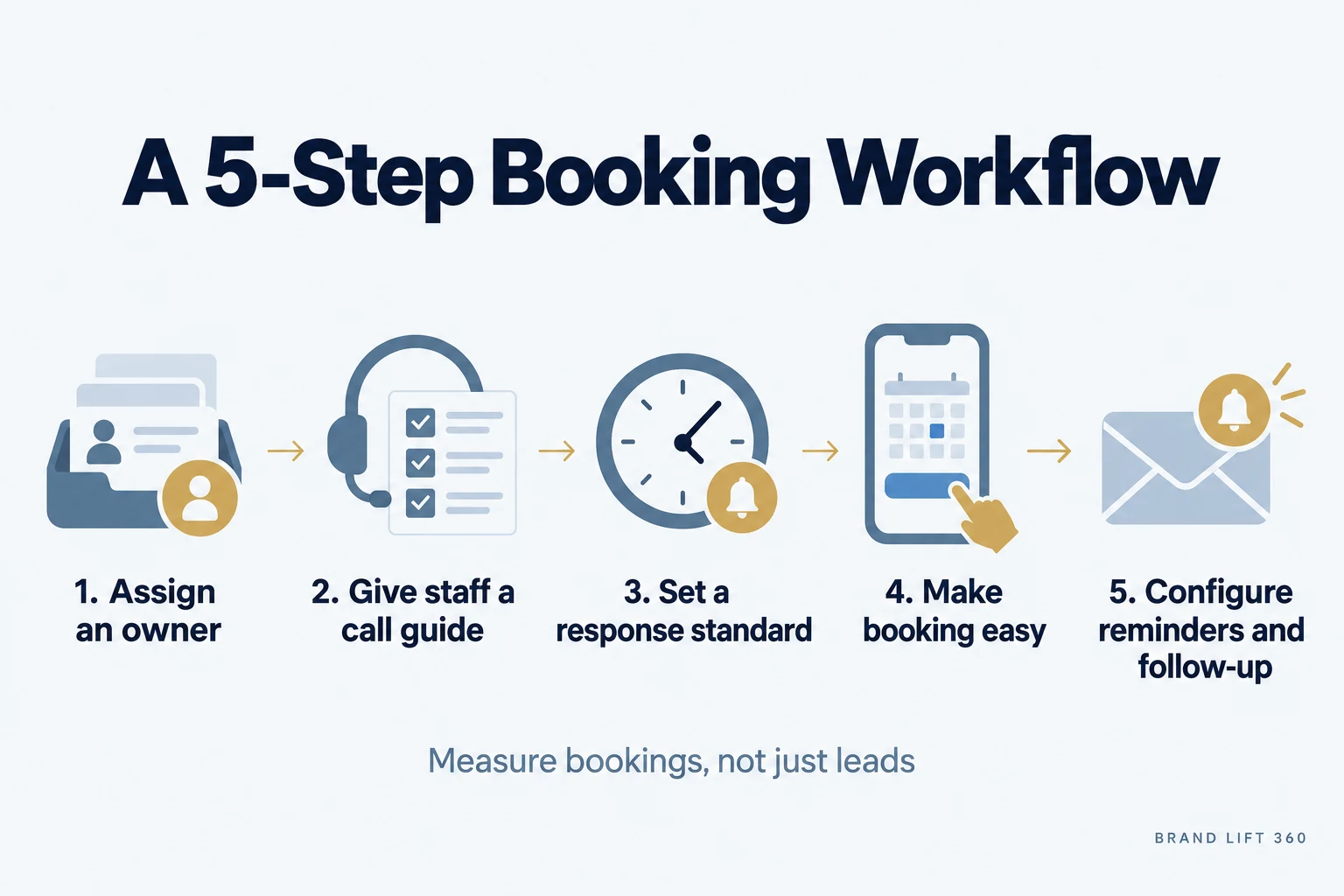
To turn missed calls and slow follow-ups into booked appointments, give every inquiry an owner, give staff a call guide, set a response-time standard, make booking easy on a phone and automate reminders. Those five steps are the booking workflow below. Speed matters because a patient who gets no answer usually calls the next practice.
Calls, forms and messages each need an assigned response. Use this five-step workflow to find where requests go unanswered and give staff one consistent process. Our healthcare CRM is built to run it, but every step works with the tools you already have.
1. Assign Every Supported Inquiry a Response Owner
Bring supported calls, forms and messages into one system your staff checks, such as a CRM (customer relationship management software that keeps every contact and conversation in one place). Record the contact, request status, owner and next action, using only information approved for that workflow.
Your process should capture:
- New phone calls and voicemails
- Website contact and appointment forms
- Text messages and social media inquiries
- Online booking activity
- Cancellations and rescheduling requests
Assign clear ownership. A shared inbox is not enough. Someone must be responsible for checking it, responding, and closing the loop.
Define simple standards:
- Who reviews new inquiries?
- How often is the queue checked?
- What qualifies as a completed follow-up?
- When does an inquiry move to a second or third attempt?
- How are urgent or clinical questions escalated?
2. Give the Front Desk an Administrative Call Guide
Use a short guide for visit types, availability and staff handoff. The purpose is to explain the appointment process, with clinical questions directed to the care team.
Identify the Request
“What prompted you to reach out today?”
This helps staff route scheduling, payment and administrative questions. Clinical assessment belongs with the appropriate care team member.
Offer a Supported Appointment Option
For example: “Our team can help you request a consultation. Would you like me to check the available times?” Use only the options and wording approved by your practice.
Confirm What Has Been Arranged
Read back the provider, office, date and time when a booking is confirmed. If it is a request, explain when the office will respond.
Give staff the information they need. Build a quick reference guide that connects common reasons for calling with the correct appointment type, provider, duration, and preparation instructions.
3. Set a Response Standard Your Team Can Meet
Set a practical response standard for every channel.
An approved acknowledgment can confirm receipt and state when staff will respond. Keep it limited to the information appropriate for the channel.
Example: “We received your request. Our team will respond during office hours. Please contact the office directly if you need help with an existing appointment.”
Assign a person to unresolved requests and test what happens after hours or when a transfer fails. If calls go unanswered at night or at lunch, a voice AI receptionist can answer, book from approved scripts and pass urgent calls to a person.
Track response time. Monitor:
- Time from inquiry to first acknowledgment
- Time from inquiry to human response
- Inquiry-to-appointment conversion rate (the share of inquiries that become booked appointments)
- Number of contact attempts
- Bookings recovered from missed calls
4. Make Appointment Requests Easy to Complete
Offer a short mobile form or supported scheduling connection. Explain whether the visitor has requested an appointment or made a confirmed booking. Clinical intake belongs in the practice’s approved system.
A strong booking flow should:
- Display a clear “Book an Appointment” button
- Work smoothly on mobile devices
- Ask only for necessary scheduling information
- Show available appointment types and times
- Confirm the provider, office and time only when the booking is completed
- Provide secure intake instructions after booking
- Make rescheduling straightforward
5. Configure Reminders and Staff Follow-Up
Set timing and channels around the practice’s scheduling rules and communication permissions. A sequence might include:
- Confirmation immediately after booking
- A reminder at a practice-approved interval
- A later reminder only where appropriate
- Simple instructions for confirming or rescheduling
Make each message actionable:
Use confirmation or rescheduling actions that the selected software actually supports, and test replies and opt-outs.
For cancellations or missed appointments, your team chooses whether and how to follow up.
Do not automatically turn every missed visit into a promotional campaign. The message, purpose and permissions need to fit the situation, and HHS guidance on HIPAA and marketing explains where a treatment reminder ends and marketing begins. HIPAA is the federal law that protects patient health information.
Measure the Completed Steps
Instead of asking only how many clicks, impressions, or leads you generated, track the metrics that affect your schedule:
- Missed-call rate
- Average response time
- Inquiry-to-booking conversion rate
- Self-scheduled appointments
- Confirmation rate
- Cancellation and no-show rate
- Reactivated patients
- Cost per booked appointment (marketing spend divided by appointments booked, which is different from cost per lead, where a lead is only a call or form)
The Booking Workflow at a Glance
| Step | What to do | What to track |
|---|---|---|
| 1. Assign an owner | Bring calls, forms and messages into one system and name who closes each one | Open inquiries with no owner |
| 2. Give staff a call guide | Identify the request, offer a supported appointment, confirm what was arranged | Calls routed to the right visit type |
| 3. Set a response standard | Send an approved acknowledgment, then a human reply within your standard | Time to first acknowledgment and to human response |
| 4. Make booking easy | Short mobile form or supported scheduling connection | Self-scheduled appointments |
| 5. Automate reminders | Confirmation and reminders on approved timing; staff decide follow-up after missed visits | Confirmation, cancellation and no-show rates |
| Measure | Report bookings, not just leads | Inquiry-to-booking rate and cost per booked appointment |
Common Questions About Booking Workflows
How fast should a medical practice respond to a new inquiry?
As fast as your team can reliably sustain, with an immediate automated acknowledgment and a human reply during office hours. Pick a standard, such as same business day, measure it weekly and fix the gaps before adding more marketing. For response-time targets by channel, see lead follow-up for medical practices.
What is a missed-call text-back?
It is an automatic text sent to a caller the office could not answer, saying the practice received the call and how to book or when staff will reply. Use approved wording and honor opt-outs.
Should reminders be automated?
Yes for confirmations and appointment reminders, as long as wording, timing and permissions are approved and replies and opt-outs are tested. Keep clinical questions with the care team.
How do I know if my booking process is working?
Track missed-call rate, response time, inquiry-to-booking rate and no-show rate each month. Cost per booked appointment shows whether your marketing spend is turning into visits.
Where to Start
Pick the handoff your team finds hardest to manage, usually missed calls at lunch or after hours, or web forms nobody owns. Give it one owner and one response standard this week, then track inquiry-to-booking rate for a month before you change anything else. See how our CRM tracks each inquiry to a booking →
Sources
- U.S. Department of Health and Human Services. Marketing (HIPAA Privacy Rule guidance: communications made for a patient's treatment, such as refill reminders, are not marketing). Content last reviewed July 26, 2013.